Tag: file conversion

Enhanced URL Download: Making File Conversion Faster, Safer, and More Reliable

In today’s digital world, we’re constantly working with files from various online sources. Whether you’re downloading a PDF from a website, converting an image from a cloud storage link, or transforming a document shared via URL, the process needs to be seamless, secure, and efficient.

We’re excited to announce significant enhancements to our URL download functionality that make converting files from web links faster, more secure, and more reliable than ever before. These improvements touch every aspect of the user experience, from initial validation to final conversion.

What’s New: A Smarter Download System

Two-Phase Validation for Better Accuracy

One of the most noticeable improvements is our new two-phase validation system. When you paste a URL, the system now performs an intelligent pre-check before starting any conversion. This means you’ll know immediately if your file is accessible and in the correct format, saving you time and frustration.

The first phase validates the URL and checks the file’s basic properties—ensuring it exists, is accessible, and matches what you’re trying to convert. Only after successful validation does the system proceed to the actual conversion phase. This approach eliminates wasted processing time on invalid or inaccessible files.

Enhanced Security and Content Filtering

Security is paramount when dealing with files from external sources. Our enhanced URL download system includes sophisticated filtering mechanisms that protect users from potentially harmful content. The system automatically checks URLs against comprehensive security criteria before processing, ensuring that only safe, legitimate files are downloaded and converted.

This multi-layered approach examines domains, URL patterns, and content characteristics to make intelligent decisions about what should be processed. Users can convert files with confidence, knowing that the system has their security in mind.

Improved Error Handling and User Feedback

Nobody likes cryptic error messages. Our enhanced system provides clear, actionable feedback when something goes wrong. Whether a URL is inaccessible, a file format isn’t supported, or a download times out, you’ll receive specific information about what happened and what you can do about it.

The system now distinguishes between different types of errors—network issues, file format problems, access restrictions, and more—providing appropriate guidance for each situation. This makes troubleshooting much easier and helps users understand exactly what’s happening with their conversions.

Better Support for Modern Web Content

The modern web is complex, with dynamic content, consent banners, and responsive layouts. Our enhanced system handles these challenges more intelligently, especially when converting web pages to PDF format. The system can now better handle cookie consent dialogs, render desktop layouts correctly, and process modern web technologies more reliably.

For HTML-to-PDF conversions specifically, the system now ensures that websites render in their full desktop layout, producing professional-looking PDFs that accurately represent the original content. This is particularly useful for archiving web pages, creating documentation, or sharing web content in a more permanent format.

Performance Improvements

Under the hood, numerous optimizations make the entire process faster and more efficient. The system now handles downloads more intelligently, with better resource management and improved processing pipelines. These improvements mean shorter wait times and more reliable conversions, even during peak usage periods.

The enhanced architecture also provides better scalability, allowing the system to handle more concurrent downloads without compromising performance or reliability.

What This Means for You

For everyday users, these enhancements translate to:

  • Faster conversions: Pre-validation means no wasted time on invalid files
  • Better reliability: Improved error handling and progress tracking reduce failed conversions
  • Enhanced security: Automatic filtering protects against potentially harmful content
  • Clearer feedback: You always know what’s happening with your conversion
  • Better results: Improved handling of modern web content produces higher-quality outputs

Looking Forward

These enhancements represent a significant step forward in making file conversion from URLs as seamless as possible. The system is now more intelligent, more secure, and more user-friendly, while maintaining the speed and reliability that users expect.

Whether you’re converting a single file or processing multiple URLs, the enhanced system provides a smoother, more reliable experience from start to finish. The improvements work behind the scenes to ensure that your conversions complete successfully, with clear feedback at every step.

Try It Today

The enhanced URL download functionality is available now. Simply paste a URL into the conversion interface and experience the improvements firsthand. The system will guide you through validation, show you real-time progress, and deliver your converted file with the reliability and security you deserve.

We’re committed to continuously improving the user experience, and these enhancements to URL downloads are just one example of that commitment. As always, we welcome your feedback and suggestions as we continue to refine and enhance our services.


Experience the difference with our enhanced URL download system. Faster, safer, and more reliable file conversion is just a URL away.
New Negate Option: Invert Colors While Converting PCX to PDF

We’re excited to introduce a powerful new advanced option for image conversions: the Negate feature, which allows you to invert colors in your images during conversion. This is particularly useful when converting older PCX files to PDF format, where you might need to create negative effects or adjust the color scheme for better readability or archival purposes. Try it now on our PCX to PDF converter.

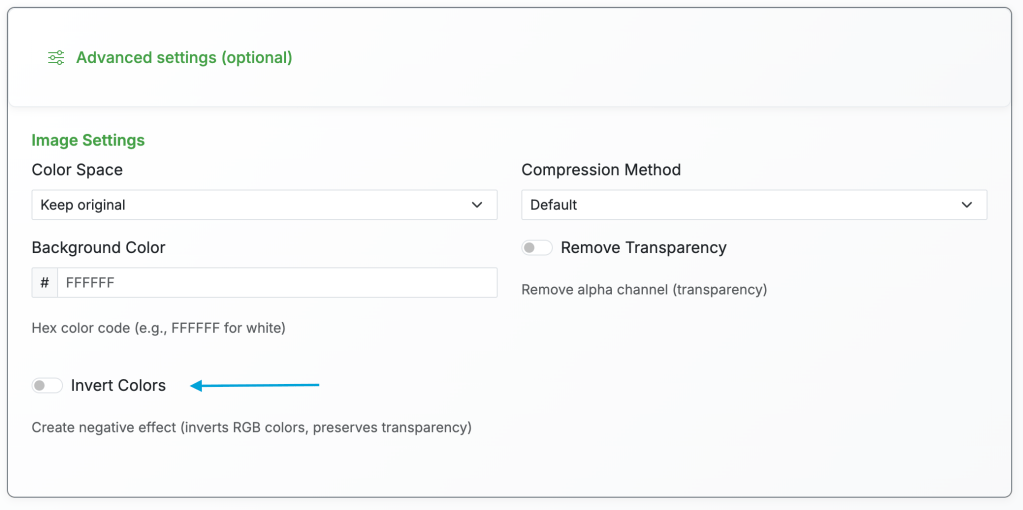
The “Invert Colors” option appears in the advanced options section when converting PCX to PDF.

What is the Negate Option?

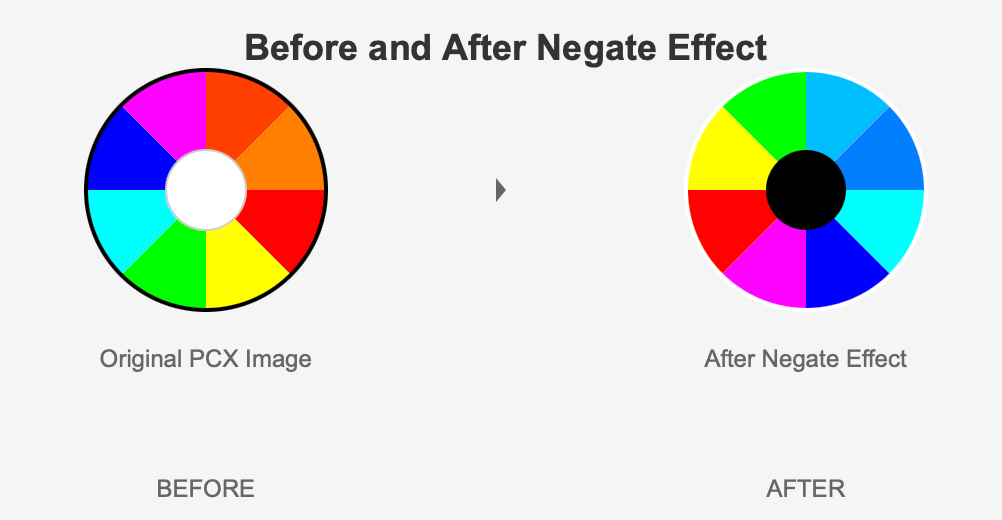
The negate option uses advanced color inversion technology to create a negative effect on your images. When enabled, it inverts all RGB color channels—white becomes black, red becomes cyan, blue becomes yellow, and so on. What makes it special is that it preserves the alpha channel (transparency), so any transparent areas in your image remain transparent even after inversion.

Why Use Negate for PCX to PDF Conversion?

PCX files are often legacy images from older systems, and they may have been scanned or created with inverted color schemes that don’t display well in modern PDF viewers. By using the negate option during conversion, you can quickly correct these color issues without needing separate image editing software. This is especially valuable for archival work, where you might be digitizing old documents or images that need color correction. Additionally, some PCX files might have been created as negatives for printing purposes, and converting them to PDF with negation can restore them to their intended appearance.

Step-by-Step Guide: Using Negate for PCX to PDF Conversion

  1. Upload your PCX file – Navigate to our PCX to PDF converter and upload your PCX file by clicking the upload area or dragging and dropping it.
  2. Select PDF as output format – Choose PDF from the format dropdown menu.
  3. Click “Fine-tune” or “Advanced Options” – This button reveals additional image settings that aren’t shown by default.
  4. Enable “Invert Colors” – Look for the “Invert Colors” checkbox in the advanced options section and click it to enable the negate feature. You’ll see a description confirming it creates a negative effect while preserving transparency.

Example showing a PCX image before and after applying the negate option during PDF conversion.

  1. Adjust other settings (optional) – If needed, you can modify other settings like color space before converting.
  2. Click “Convert” – Start the conversion process. The system will process your file and apply the color inversion.
  3. Download your PDF – Once conversion is complete (usually just a few seconds), download your PDF file with the inverted colors. If you’re not satisfied, simply upload again and try different settings.

Practical Use Cases

Beyond PCX to PDF conversion, the negate option is useful for a variety of scenarios. Graphic designers might use it to quickly create negative versions of logos or images for design mockups. Photographers converting RAW or scanned images might find it helpful for correcting inverted scans or creating artistic effects. Archivists working with old document scans can use it to improve readability when original documents had poor contrast or were scanned incorrectly.

Conclusion

The new negate option adds another powerful tool to our image conversion arsenal, making it easier than ever to manipulate images during format conversion. Whether you’re working with legacy PCX files, creating artistic effects, or correcting color issues in scanned documents, this feature provides a simple, one-click solution that preserves image quality and transparency. Try it out now on our PCX to PDF converter and discover how color inversion can enhance your workflow.

New Conversion Paths and 17 New Formats

We have expanded our conversion capabilities with support for 17 new file formats and over 114 new conversion paths. This update focuses on modern image formats, professional camera RAW files, efficient audio codecs, and developer-friendly document formats.

Modern Image Format Support

The update introduces full support for AVIF, the next-generation image format based on the AV1 video codec. AVIF files are typically 50% smaller than equivalent JPEG files while maintaining the same visual quality, making them ideal for web use. Users can now convert common formats like JPG, PNG, WebP, BMP, and TIFF to AVIF, as well as convert AVIF files back to these traditional formats.HEIC and HEIF support addresses a common pain point for iPhone users. Since iOS 11, Apple devices capture photos in HEIC format by default, which offers excellent compression but limited compatibility with non-Apple software. FreeFileConvert now handles these files seamlessly, converting them to JPG, PNG, WebP, BMP, or TIFF with a single click. Animated PNG (APNG) joins the supported formats as a superior alternative to GIF. Unlike GIF’s 256-color limitation, APNG supports millions of colors and full alpha transparency. The service supports conversion between GIF and APNG, as well as APNG to static PNG and WebP formats.WebP, Google’s image format designed for the web, now has complete bidirectional conversion support. Users can convert to and from JPG, PNG, GIF, BMP, and TIFF.

Professional RAW Camera Support

Photographers working with RAW files will find comprehensive support for major camera manufacturers. Canon users can convert CR2, CR3, and CRW files. Nikon’s NEF and NRW formats are supported, along with Sony’s ARW, SR2, and SRF files. The update also covers Fujifilm RAF, Olympus ORF, Panasonic RW2, Pentax PEF, and Adobe’s universal DNG format. All RAW formats convert to standard outputs including JPG, PNG, and TIFF. This provides a quick way to share professional photos without requiring specialized editing software. The service processes the RAW data and produces properly exposed images suitable for immediate use.

Audio Format Additions

Opus codec support represents a significant addition to the audio conversion options. Developed by the Xiph.Org Foundation and standardized by the IETF, Opus provides excellent audio quality at low bitrates and is widely used in voice and music streaming applications, including Discord, WhatsApp, and YouTube. The service supports conversion between Opus and MP3, WAV, FLAC, AAC, OGG, and M4A formats.M4A, Apple’s audio container format commonly used in iTunes and Apple Music, now has full conversion support. Users can convert between M4A and popular formats, including MP3, WAV, FLAC, OGG, and AAC.AMR (Adaptive Multi-Rate) conversion has been fixed and enhanced. This format, designed specifically for speech encoding and commonly used in voice recordings and mobile ringtones, requires specialized encoding parameters. The service now properly handles AMR conversion from over 28 source formats including MP3, WAV, AAC, FLAC, and various video formats.

Video Format Updates

Transport Stream (TS) format support has been added for users working with broadcast and streaming content. The format is commonly used in digital television broadcasting and video streaming. Conversions are available between TS and MP4, MKV, AVI, and MOV formats.

Document and Developer Formats

The update adds several formats commonly used in software documentation and data science workflows. Markdown files can now be converted to HTML, PDF, DOCX, ODT, EPUB, reStructuredText, plain text, and PowerPoint presentations. Jupyter Notebook support allows data scientists and researchers to convert their .ipynb files to HTML, PDF, Markdown, and DOCX formats. This provides an easy way to share notebook content with collaborators who may not have Jupyter installed.reStructuredText, the markup language commonly used in Python documentation, can be converted to HTML, PDF, DOCX, and Markdown. Org Mode files, used primarily with the Emacs text editor, can similarly be converted to HTML, PDF, DOCX, and Markdown.

Font Format Support

WOFF2, the latest web font format offering improved compression over its predecessor, is now supported. Web developers can convert TTF and OTF font files to WOFF2 for web use, and WOFF2 files can be converted back to TTF format.

Technical Improvements

Several backend improvements accompany the new format support. Additionally, several broken conversion paths have been removed, including APE audio output (which lacks an encoder) and BibTeX document export (which was producing errors).

Summary

This update adds 17 new formats across image, audio, document, and font categories, along with 114 new conversion paths. The improvements address common user requests, including iPhone photo conversion, modern image formats, and developer documentation tools. All new conversions are available immediately at FreeFileConvert.com.